Resources and Support
Resources and Support brings together everything that surrounds the ConverSight platform itself. ConverSight is committed to giving every user the material they need to succeed with the platform, whether you signed in for the first time this morning or have been working in it for years. That material falls into four groups: this documentation for depth, Quick Help inside the platform for answers in the middle of a task, ConverSight Academy for structured learning and certification, and the support team for everything the first three do not resolve.
This page sets out what each resource covers, why you would reach for it over the others, and how to get to it — including how to reach the support team when you need a person rather than a page. Every section below follows that order, so you can stop reading a section as soon as you know it is not the one you want.
Explore ConverSight
Documentation is the resource to reach for when you need to understand something rather than simply get past it — the behavior behind a setting, the reason a feature is designed the way it is, or the edge cases a quick answer leaves out. Three routes through it, depending on what you need:
| Resource | What it covers | Use it when |
|---|---|---|
| Features | AI Intelligence, AI Agents, and the Workbench, one page per surface | You are learning a surface end to end |
| How-to procedures | Short, step-by-step instructions for a single task | You know what you want to do and need the steps |
| Use cases | Worked scenarios that run from question to decision | You want to see the platform solve a real problem |
If the platform is new to you, start with the Platform overview, which explains the architecture and the four levels of Athena intelligence before you open any individual feature.
Quick Help
Quick Help is the support surface built into the platform itself. It exists because leaving the platform to search documentation breaks the thread of whatever you were doing, and most in-task questions are small enough that the interruption costs more than the answer is worth.
To open it, click on the Help (Question Mark) icon at the top right corner of the page. The Help Center opens with the product tour, suggested documents, video tutorials, and a search field that continues into Athena Help.
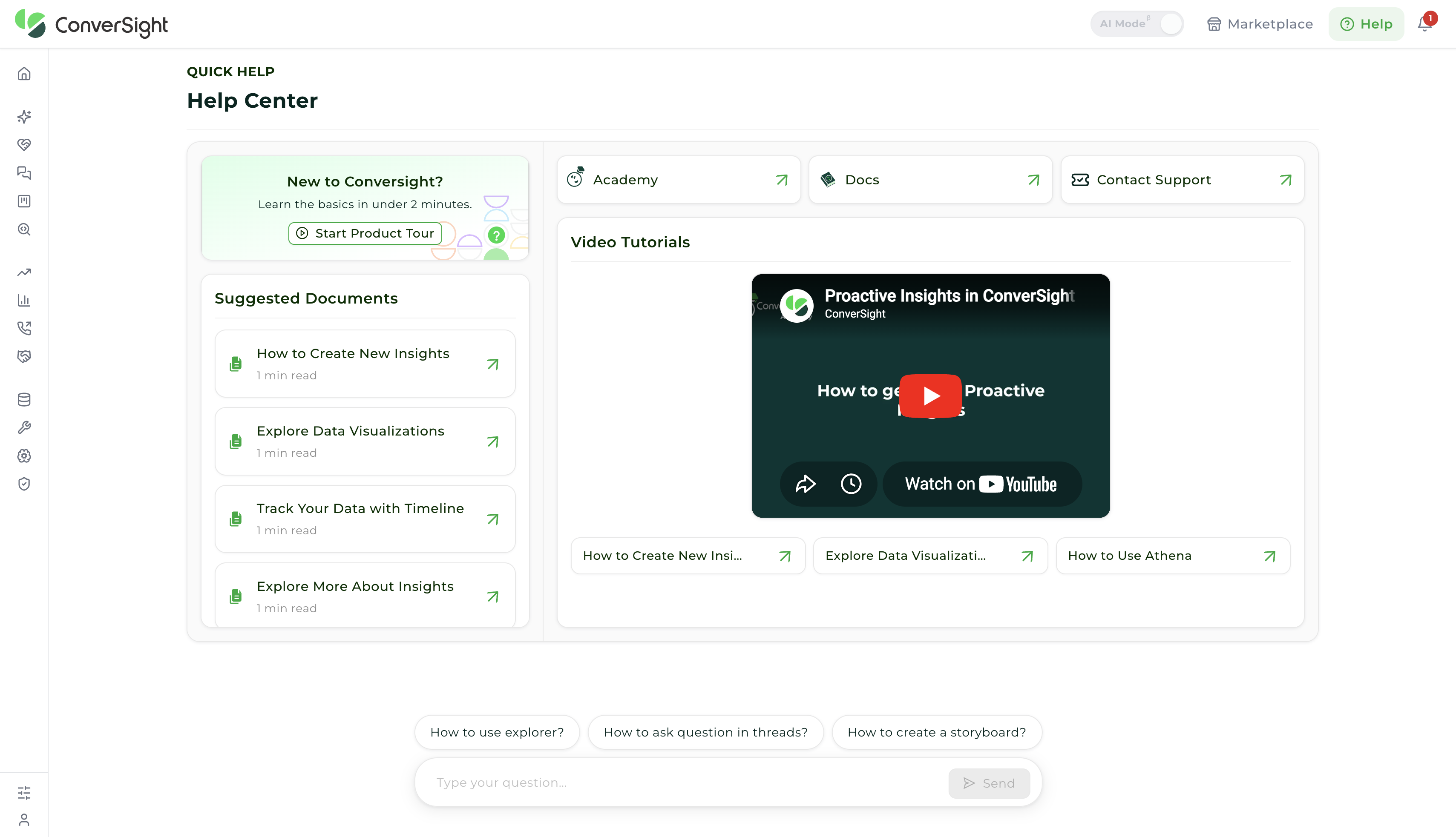
Three cards across the top of the Help Center lead to the resources covered on this page:
- Docs: the detailed product documentation of ConverSight, covering every feature and every aspect of the platform. Reach for it when you need depth — how a surface behaves, or the steps for a task you have not done before. See Explore ConverSight.
- Academy: the structured learning path through the platform, together with the certifications that close each course. Reach for it when you are building skill in a role rather than answering a single question. See ConverSight Academy.
- Contact Support: a direct line to the ConverSight support team. Describe what you need and the request becomes a ticket that a member of the team picks up and answers, so you are never left working it out alone. Reach for it when the documentation does not cover your question, or when something is not behaving the way you expect. See Support Options.
The Quick Help page documents the Help Center in full.
ConverSight Academy
ConverSight Academy is the learning side of ConverSight — structured courses that take you from first sign-in to working confidently in the platform, organized around the role you actually perform rather than a list of features. Each course is self-paced and free to workspace users, so a team can work through one together or an individual can pick it up between projects.
The reason it is organized that way is that reading about a surface and being able to use it are different things. A course follows the same sequence the work does: each step pairs the reference to read with the task to carry out and a check that confirms it worked, run against real data rather than a demonstration. What you finish with is a repeatable workflow, not a tour.
Every course ends in a certification. Each one combines a timed knowledge check with a practicum — a take-home exercise assessed against a published rubric — so the credential reflects work you have done rather than material you have read. Browse the catalog at ConverSight Academy, or open Academy from inside the platform through the Academy card in Quick Help.
Support Options
ConverSight offers two ways to reach the support team. Both are handled by the same people and tracked the same way, so the choice comes down to where you are when the question comes up and how much detail you need to send.
- Contact Support raises a ticket from the Help Center, with your workspace context attached automatically. A member of the support team picks it up and replies on the ticket, which keeps the question, the answer, and any files in one place. Use it whenever you are already in the platform — it is covered under Raising a Support Request below.
- Email Support reaches the same team at info@conversight.ai without signing in. Use it when you are away from the platform, when you cannot sign in at all, or when the question belongs in an existing email thread with colleagues. See Email Support below.
Raising a Support Request
Selecting Contact Support opens the ConverSight Support request form. The form asks for structured detail rather than a free-text message because that is what lets a request be routed to the right person and answered without a round of clarifying questions.
Complete the fields below and click on the Submit button to raise the ticket. Name, Email, Subject, and Description must be filled in before the form can be submitted; the remaining fields add context and can be left empty.
| Field | Description |
|---|---|
| Name | The name used when the support team replies. |
| The address the ticket and every response are sent to, so use the one you read day to day. | |
| CCs | Copies additional addresses on the ticket, for colleagues who need to follow the exchange, such as a manager or anyone else who hit the same issue. Leave it empty when nobody else needs to see the reply. |
| Priority | Indicates how urgent the issue is, which guides the order in which requests are picked up. Reserve the highest level for work that is genuinely blocked, so that it stays meaningful when you use it. |
| Subject | A short summary of the issue, used as the ticket title. Something specific, such as "Storyboard schedule not sending on Mondays", is easier to route than "Storyboard problem". |
| Description | The full detail of the request. The editor supports formatting, lists, code, and inline images, so paste error text and screenshots directly where they belong in the explanation. |
| Attachments | Carries supporting files such as screenshots, exports, or logs. Drag files onto the area or click to upload, up to 500 MB per file. Evidence of the issue usually shortens the time it takes to resolve. |
As the form is completed, the AI Suggestions panel alongside it surfaces relevant guidance, which often resolves the question before the request is submitted.

Describe what you were doing, what you expected, and what happened instead. The more context the request carries, the faster it can be resolved. Once submitted, the ticket reaches the support team and a member of the team responds directly on it.
Email Support
Email reaches the support team at info@conversight.ai and is answered within 24 hours on business days, though replies may take longer over weekends and holidays. It suits detailed questions, anything you need a written record of, and any situation where the platform itself is unreachable.
Include the same detail a ticket would carry: what you were doing, what you expected, what happened instead, and the name of the workspace you were working in. Attach screenshots or exports where they help, and copy any colleague who needs to follow the exchange — replies go to everyone on the thread, so the conversation stays in one place.
Onboarding and training sessions are available for teams getting started, along with personalized walkthroughs for organizations evaluating the platform. Contact your ConverSight account team or email info@conversight.ai to arrange one.
For any queries, please get in touch with our support team at info@conversight.ai.